Cat5e RJ45 Network Keystone Toolless Jacks
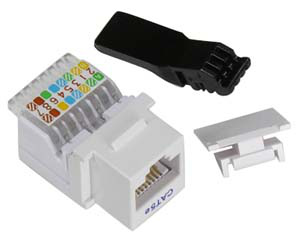

- Cat5e RJ45 Jack
- Fits Keystone wall plates
- Toolless installation
General Description
These RJ45 Keystone Jacks provide an excellent method of bringing network connections into any room. They fit into any standard keystone jack wall plate. Installation is easy and requires no special tools. Wire color codes are included on the jack to assist in following the standard wiring scheme (T568B is common in the USA).
These jacks are white in color.
Technical Information
RJ45 Pinout, looking at face of jack:
The jacks are labeled for both T568A and T568B wiring schemes. In the USA, T568B is very common. If you use T568B, the wire colors are connected to the pins as shown below:
| RJ45 Pin | Wire Color | Stripe | Signal |
|---|---|---|---|
| 1 | White | Orange | TX+ |
| 2 | Orange | White | TX- |
| 3 | White | Green | RX+ |
| 4 | Blue | White | unused |
| 5 | White | Blue | unused |
| 6 | Green | White | RX- |
| 7 | White | Brown | unused |
| 8 | Brown | White | unused |
The wires with corresponding colors (e.g. white with orange stripe and orange with white stripe) are twisted in the network cabling and should remain twisted as much as possible when terminating the cable at a jack.
Installation Instructions
- Strip back the outer jacket on the CAT5(e) cable (around 3/4" to 1" is typical) and separate the four wire pairs.
- Open the plastic color-coded clamp on the keystone jack and insert one or two pairs according to the colors shown on the jack (568B is typical in the USA). Which pair you do first does not matter, although it generally works best to work from one end to the other. Insert the wires at approximately a 45° angle, trying to insert as close to the plastic clamp hinge as possible.
- Close the plastic clamp (this forces the wires down into the insulation displacement prongs) to seat/connect that pair of wires.
- For each remaining pair, reopen the plastic clamp, insert, and close. Do not try to clamp all wires at once, or too much force will be required.
- A lever tool is included with each jack; the tool can be used instead of the built-in color-coded clamp if desired. To do this, the color-coded clamp must be hinged up and temporarily removed; the lever tool can be inserted in its place and pressed down to seat the wires (again, one or two pairs at a time). Once finished, re-insert and close the color-coded clamp. Using the lever tool is not necessary, but it is included for those who find it easier.
- When all wires are seated, insert the plastic "key" behind the color-coded clamp to secure it closed.
Pricing and Ordering
| Product # | Description | 1+ | 10+ | RoHS | Buy Now |
|---|---|---|---|---|---|
| WJ5E2W | Cat5e RJ45 Network Keystone Jack, Toolless, White | $2.99 | $2.50 | No |
| Quantity | Price |
|---|---|
| 1+ | $2.99 |
| 10+ | $2.50 |
All of the above items are normally stocked. Please call us if you need to verify availability for a specific quantity, or for pricing at higher quantities. Please visit our ordering page for our ordering policies and a list of ordering methods.